
In 2026, clean data has become essential for predictable pipeline generation. Yet in PhantomBuster’s State of Sales on LinkedIn for 2026, we observed a widening quality gap caused by inconsistent data practices. One of the clearest signals: 40% of respondents still update LinkedIn activity manually in the CRM, making it difficult for sales and marketing teams to keep their systems accurate at scale.
This reliance on manual input accelerates the creation of dirty data—duplicate records, outdated information, and incomplete profiles. These issues break marketing efforts, weaken targeting, and reduce the efficiency of email campaigns long before a prospect receives a message.
This guide shows how poor data quality slows outreach and how B2B data hygiene practices keep records accurate. We’ll also show how to set this up with PhantomBuster automations.
The high cost of dirty data
Dirty data is more than an operational nuisance. It is a compounding revenue leak. In B2B environments, data decays every time a prospect changes jobs, updates their role, or switches companies. If your data collection relies on static lists or outdated exports, quality erodes long before outreach even begins.
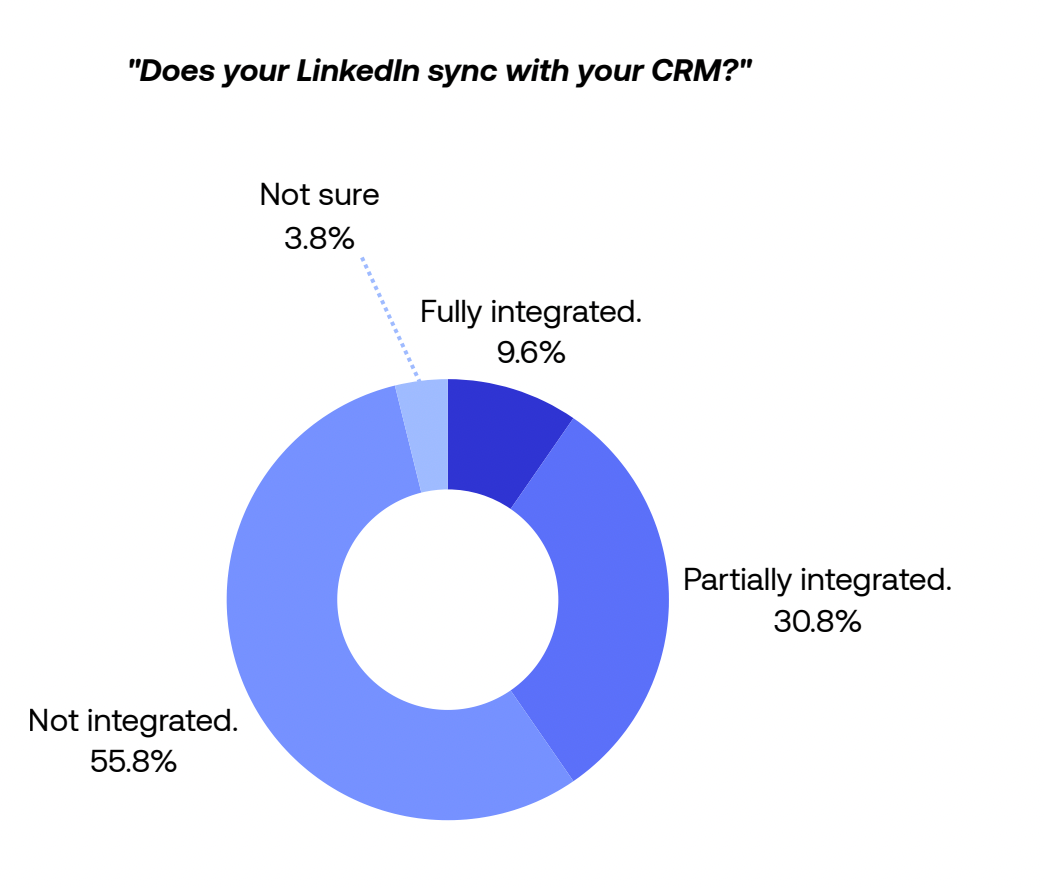
Source: PhantomBuster, State of Sales on LinkedIn 2026
A mid-market AE from the survey highlighted this frustration:
LinkedIn is extremely limited in its ability to screen ICP and the data is less reliable than other sources. Targeting on job title is not accurate.
This reflects a broader pattern: filtering by job title alone misses critical context. Add seniority level, function, and company size to improve targeting accuracy.
When sales and marketing operate on inaccurate data, the downstream effects are immediate and costly:
- Duplicate entries create data silos, where multiple reps unknowingly engage the same prospect
- Outdated contact information leads to bounced outreach and wasted effort
- Inaccurate reporting blinds leadership to the true state of the funnel
Good data hygiene is not about fixing errors after they appear. It is about preventing them. Define field formats, assign owners, and set an update cadence. Use automations to refresh job title, company, and status on a schedule.
How do you automate data hygiene without introducing new errors?
Maintaining clean data starts with removing the human element from data entry. Manual updates introduce inconsistencies, typos, and format drift. Automation reduces these inconsistencies because it applies the same rules every time.
Use PhantomBuster automations inside your existing workflow to extract and refresh LinkedIn fields before records hit the CRM. Automate field refreshes from LinkedIn and Sales Navigator within allowed usage limits. Map fields—title, company, LinkedIn URL—and schedule runs so records enter the CRM already updated.
Follow LinkedIn and Sales Navigator usage limits and terms; set conservative run rates and use official exports where required.
A Product Expert at PhantomBuster, Nathan Guillaumin, explains how PhantomBuster automations (internally called “Phantoms”) create a dynamic filter for quality:
You can create a dynamic list of leads with filters. Leads processed by this phantom, having job titles with keywords like ‘director,’ working in specific industries. The leads answering to these conditions will enter the list automatically. You don’t need to do anything.
Dynamic filters keep lists current so only leads that match your criteria enter sequences. Because the same rules run every time, your formats stay consistent.
Strategy: enrichment as a hygiene layer
Data enrichment is one of the most effective ways to maintain data quality. A prospect’s LinkedIn profile may be perfectly up to date, yet your CRM still stores their job title or email from several years ago. Enrichment closes that gap.
Run the LinkedIn Profile Scraper automation to extract current titles and companies, then compare to your CRM. This targeted list refresh lets you correct outdated entries at scale.
Here is the expanded workflow:
- Export your target list with LinkedIn URLs from your CRM.
- Run the LinkedIn Profile Scraper automation on that list to pull current profile data.
- Map fields (Title, Company, Start Date, LinkedIn URL) so data aligns with your CRM structure.
- Schedule weekly runs to keep records fresh automatically.
- Push updates to HubSpot or Salesforce via integration so reps see the latest information.
- Log changes (who updated, when) and review exceptions to catch formatting issues early.
This enrichment workflow turns data management from a tedious cleanup task into a proactive hygiene layer. Sales teams always operate with accurate data before sending emails, dialing prospects, or triggering automated sequences.
How do you sync updates to the CRM without creating silos?
One of the biggest barriers to data hygiene best practices is the transfer of information between tools. When you paste results from third-party tools into the CRM, formatting drifts and duplicates creep in.
Several respondents asked for automatic Salesforce sync without internal engineering support. One noted:
To be automatically synced with Salesforce without our internal coding.
This comment reflects a wider challenge: sales teams want accurate data to flow into the CRM without manual work or technical intervention.
PhantomBuster integrates with HubSpot and Salesforce so refreshed fields land in the right records automatically. Map LinkedIn URL as a unique key and update title and company fields. For emails and phone numbers, route through your verification provider and write only validated results. Reps see the latest details without copy-paste.
Comparison: manual entry vs. automated hygiene
Manual processes remain one of the biggest threats to data quality. When information is copied by hand into a CRM, errors, inconsistencies, and outdated fields accumulate quickly. Automated enrichment reduces these issues by refreshing data at the moment it enters your system.
Below is a clear comparison of the two approaches.
| Metric | Manual Data Entry | PhantomBuster Automated Hygiene |
|---|---|---|
| Accuracy | Prone to typos and human error | Near-source match when field mapping is correct; spot-check a sample each run* |
| Freshness | Decays immediately | Refreshes on schedule (daily/weekly) based on your run cadence |
| Duplicates | High risk of duplicate records | Reduced duplicates when you use LinkedIn URL or email as unique keys and apply your CRM’s dedupe rules |
| Completeness | Often missing fields | Enriched data such as company domain, role, and public profile URL |
| Time Cost | Hours per week per rep | Minimal ongoing time (monitor exceptions, minutes per week) |
* We recommend sampling 50–100 records after each run to verify field mapping accuracy.
Hygiene is a process, not a project
Data hygiene refers to the ongoing discipline of keeping records clean. It is not a one-time spring cleaning effort. As long as people change jobs, B2B data hygiene must remain an ongoing process.
Automating updates standardizes titles and companies, cuts copy-paste, and reduces bounced outreach. You shift from bad data that slows growth to high-quality data that accelerates it.
In 2026, reliable information is a competitive advantage. Do not let poor-quality data become the reason a conversation stalls or a deal is lost.
FAQ: B2B data hygiene best practices
What is B2B data hygiene?
B2B data hygiene is the practice of keeping CRM and marketing platform data clean, accurate, and up to date. It includes removing duplicate entries, correcting inaccurate data, filling incomplete profiles, and verifying email addresses and postal addresses. Strong data hygiene ensures marketing efforts reach the right targets and that sales teams work with reliable information that improves conversions.
Why is data hygiene important?
Proper data hygiene prevents the costly effects of bad data, such as lower conversion rates, higher bounce rates, and wasted time for sales teams chasing unqualified leads. Maintaining data quality improves forecasting accuracy and prevents inaccurate reporting, which can mislead leadership. Clean, reliable data strengthens every stage of the sales process and supports long-term revenue performance.
How often should I clean my B2B data?
Data hygiene should function as an ongoing process. Quarterly data audits are useful, but teams benefit most when customer data is validated continuously. Schedule daily or weekly runs so new records are refreshed automatically. Use your email verification provider before writing emails to the CRM. This prevents data decay early and ensures your CRM remains accurate without relying on manual updates.
How do I prevent duplicate records?
Duplicate records usually appear when data comes from multiple sources without consistent data standards. Use your CRM’s deduplication rules (e.g., email or LinkedIn URL). PhantomBuster helps by providing consistent identifiers that your CRM can match against, keeping your database consistent with minimal manual effort.
What is data enrichment?
Data enrichment improves existing records by adding verified data points from reliable sources. For example, you can enhance a list of names and job titles with additional data points (e.g., company domain, role, public profile URL). For emails and phone numbers, append where available and verify with your provider before use. Enrichment turns incomplete records into valuable insights, enabling better segmentation, stronger personalization, and more effective outreach across your sales pipeline.
How does bad data affect email marketing?
Poor data quality harms email deliverability. If your messages target invalid or outdated contact information, hard bounce rates increase, and Internet Service Providers flag your domain as risky. This weakens your sender reputation and reduces inbox placement. Strong data hygiene ensures verified and accurate details, helping your messages reach the right audience and improving overall campaign performance.
Is data hygiene related to data security?
Yes. Data governance and data security rely on maintaining accurate visibility over what information your systems hold. Retaining outdated sensitive information or financial data increases exposure during data breaches. Strong data hygiene practices involve deleting or archiving outdated information that no longer serves business needs, reducing security risks while keeping your CRM aligned with compliance and operational requirements.
Can automation fix dirty data?
Yes. Automated tools offer the most effective way to correct dirty data at scale. Automation can verify records, identify duplicates, standardize formats, and validate data far faster than manual entry. These data management capabilities eliminate human error, ensure consistency, and keep large datasets accurate as they grow. Automation typically delivers more consistent precision and speed than manual workflows at scale.
Next steps: set up a weekly title and company refresh in 10 minutes
Ready to implement automated data hygiene? Here’s how to start:
- Install the LinkedIn Profile Scraper automation from the PhantomBuster library
- Map fields (Title, Company, Start Date, LinkedIn URL) to match your CRM structure
- Schedule weekly runs to refresh records automatically
- Connect HubSpot or Salesforce using the native integration
- Review a 50-record sample after the first run to verify accuracy
Start with a small pilot list, validate results, then scale to your full database. Clean data becomes a sustainable advantage when it runs without manual intervention.