

Finding safe LinkedIn data-extraction workflows is now a core requirement for revenue teams. Safe means steady cadence, device independence, and conservative daily limits that avoid triggering platform restrictions.
Our State of Sales on LinkedIn for 2026 report shows that 56% of respondents do not have LinkedIn connected to their CRM, with 40% updating activity manually. Manual updates delay CRM sync and reduce list freshness, which lowers reply rates and creates duplicate outreach.
At the same time, our 2025–2026 LinkedIn disconnection analysis reveals that browser-based tools show a higher rate of session interruptions than cloud-based runs, which raises concerns about account restrictions.
When choosing a LinkedIn automation tool, teams usually compare Chrome extensions with cloud-based solutions such as PhantomBuster. Both can help generate leads, but one runs on your device while the other runs on managed cloud servers with built-in scheduling and rate limiting.
Here’s why many teams prefer cloud-based apps as of February 2026.
The “Burst” Risk of Browser Extensions
Browser extensions live in your toolbar. They interact with dynamic web applications like LinkedIn directly through your web browser. They are often cheaper, but they rely entirely on your computing power and internet connection.
This creates a risky behavioral pattern we call “The Slide and Spike.” Because the extension only works when your computer is on and the tab is open, users tend to cram all their activity into short windows.

Why is this risky?
In our 2025–2026 LinkedIn disconnection study, we identified the “Slide and Spike” pattern across hundreds of automation runs. Restrictions rarely happen randomly. They happen when activity surges sharply in a short period.
Our dataset shows that disconnects are preceded by activity spikes averaging +118% within 45-minute windows. Extensions push users into this behavior because they cannot run around the clock. They force you to sprint, and sprinting triggers alarms.
The same study found that session cookies expired 30–40% earlier when activity depended on browser-bound bursts rather than steady, distributed execution.
The Cloud Advantage: Infrastructure and Consistency
Cloud-based automation tools like PhantomBuster run on remote servers backed by managed cloud providers (Google Cloud Platform and AWS). Because execution happens in the cloud, your workflows do not depend on your laptop battery, browser tab, or local machine stability.
This architecture enables a predictable low-and-slow execution model. Instead of extracting 100 profiles in 30 minutes, PhantomBuster can distribute the same 100 profiles across several hours. This avoids the burst-style activity spikes that trigger LinkedIn safety systems.
In our tests, steady low-frequency runs produced fewer disconnects than short high-volume bursts. The difference comes down to how LinkedIn’s behavioral monitoring interprets velocity.
What our data says:
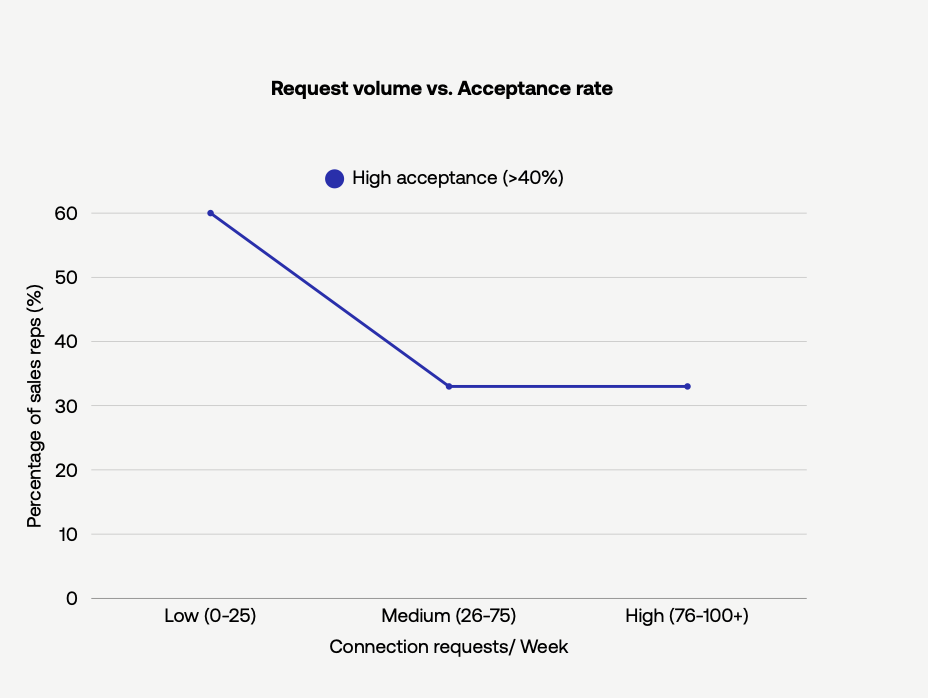
Our 2026 report found that sales reps who send fewer than 25 connection requests per week had 1.9x the acceptance rate (≥35%) compared to those pushing higher volumes (December 2025–January 2026, n=1,247 users).
PhantomBuster’s scheduler spreads requests across the week to maintain a steady cadence you define—a pattern that’s hard to maintain manually at scale.
PhantomBuster schedules and rate-limits runs to help keep activity smooth, consistent, and within safe limits you set.
Top LinkedIn Automation Tools Compared
To help you make an informed decision, here is a comparison of the three main automation architectures used as of February 2026: cloud-native tools like PhantomBuster, browser extensions like Dux-Soup, and desktop applications like Linked Helper 2.
We also include API-centric data-extraction services such as Bright Data’s LinkedIn API extractor for pure data-extraction workloads.
| Feature | PhantomBuster (Cloud) | Dux-Soup (Extension) | Linked Helper 2 (Desktop) | Bright Data (API) |
|---|---|---|---|---|
| Infrastructure | Cloud based. Runs on remote cloud servers. No installation needed. | Browser extension running inside your local browser. | Desktop application installed on your operating system. | API based. Runs on Bright Data’s proxy network and data center infrastructure. |
| Runs without your device on? | Yes. Tasks can be scheduled any time; device-independent. | No. Stops if the browser closes, the computer sleeps, or your internet drops. | No. Requires the app to remain open. | Yes. API access independent of your device. Requires programmatic setup. |
| Built-in scheduling/rate limits? | Yes. Runs in isolated cloud environment with consistent IPs and scheduling; no local browser code injection. | Limited. Depends on local IP and prone to activity spikes. | Limited. May require elevated OS permissions; actions occur on your local machine. | Yes, but requires careful configuration to avoid rate limits. |
| Native CSV/Sheets export? | Yes. Structured data in CSV, JSON, or Google Sheets. | Manual CSV export. | Manual CSV export. | JSON via API, built for data engineering pipelines. |
| Works with CRM sync? | Yes. Native integrations with HubSpot, Salesforce, and other CRMs. | Limited. Requires manual export and upload. | Limited. Requires manual export and upload. | Yes, via custom API integration. |
| Best For | Sales teams needing scalable, reliable automation. | Solo users handling small tasks. | Power users wanting deep workflow control. | Data engineers performing large-scale data extraction. |
The Verdict: If you are a solo freelancer, an extension might be enough. For team-scale outreach where reliability matters, PhantomBuster’s cloud architecture typically delivers more consistent execution than local tools.
Automation Workflows: Moving From Manual to Automated
To understand the difference in practice, here is how a sales rep executes a standard lead-generation workflow using cloud solutions compared with local browser extensions.
The cloud approach chains automations into one integrated workflow: export Sales Navigator search → deduplicate → enrich → push to HubSpot, all inside PhantomBuster. These automations share scheduling and rate limits, so you control the pace across the entire pipeline.
Scenario A: Building a Lead List
The Browser Way: You perform a Sales Navigator search, scroll through pages, and rely on an extension to extract data in real time. You must keep the tab open and the machine awake, which ties up your browser. If you use this path, cap runs to 50 profiles/hour and schedule breaks to reduce spikes.
The Cloud Way: You paste the search URL into the PhantomBuster Sales Navigator Search Export automation, click Launch, and close the tab. PhantomBuster processes the list in the cloud and delivers a CSV or Google Sheets file. You receive a notification when your Sales Navigator search results are ready. This extraction feeds the next PhantomBuster automation automatically.
Scenario B: CRM Enrichment
The Browser Way: You download a CSV, manually upload it into HubSpot, use separate tools to verify email addresses, and repeat the process whenever your list changes. This friction mirrors the challenges highlighted in our report, where a large segment of users still struggle with manual CRM updates.
The Cloud Way: You connect the HubSpot CRM Enricher automation. It monitors new connections and enriches them automatically. When a lead connects, PhantomBuster fetches public profile data and pushes the cleaned contact directly into HubSpot. No tab needs to stay open and no repeated data extractions or manual re-uploads are required.
Safety Architecture: Proxies and Environments
The most technical and most important difference between tools is the environment they operate in.
Browser extensions inject code directly into the webpage you are viewing. Traditional web applications and LinkedIn’s internal security systems can inspect the Document Object Model (DOM). If they detect injected scripts manipulating buttons or fields, the account can be flagged. This DOM-level exposure is also highlighted in LinkedIn disconnection analyses.
PhantomBuster runs inside a clean, headless browser hosted in the cloud. It mimics standard browsing behavior runs inside a clean, headless browser hosted in the cloud. It mimics standard browsing behavior when interacting with LinkedIn profiles, company pages, and LinkedIn Jobs. Activity is routed through a consistent proxy environment, which keeps your automation isolated from your personal browsing. Using a dedicated, consistent IP reduces sudden environment changes (device/IP/locale)—a common factor in session resets.
Frequently Asked Questions About Data-Extraction Safety
Is PhantomBuster safe for LinkedIn automation?
Yes. PhantomBuster operates from a cloud platform using a consistent proxy environment, which isolates automation from your local browsing. This avoids DOM exposure and reduces the risk patterns identified in LinkedIn disconnection analyses. By setting conservative daily limits, you mimic natural activity. By setting conservative daily limits, you mimic natural activity and avoid the burst behaviors that commonly trigger restrictions.
Why are cloud-based applications safer?
Cloud apps run continuously without relying on your computer, allowing activity to be spread over long periods. This prevents the short, high-volume bursts created by extensions when a laptop is open. A web-based solution maintains steady, low-frequency execution, which is closer to natural user behavior and improves account safety.
Can LinkedIn detect automation tools?
LinkedIn primarily detects automation through behavioral signals, such as high velocity or repetitive actions. Detection can also happen when tools inject code into the browser, which exposes activity through the DOM. Cloud applications like PhantomBuster run in a separate environment and do not modify your local browser, making them harder to fingerprint via local browser signals like DOM injection artifacts.
Do I need technical expertise to use cloud-based data extraction?
No. PhantomBuster provides a simple user interface designed for non-technical teams. You select your workflow, connect your account, choose your target list, and run your automation in the cloud. The platform handles extraction, scheduling, and delivery. You do not need to manage web servers, proxies, or code.
Does PhantomBuster work with Sales Navigator?
Yes. PhantomBuster includes automations like Sales Navigator Search Export and Sales Navigator Profile Export that support the larger result sets and advanced filters available in LinkedIn Sales Navigator. These automations output structured data for enrichment, scoring, or CRM workflows.
Start Building Safer LinkedIn Workflows Today
Start with the LinkedIn → CRM workflow template in PhantomBuster: Sales Navigator Search Export → Email Discovery & Verification → HubSpot CRM Enricher.
Schedule 10–15 profiles per hour, 5 days per week. Track acceptance and reply rates in Google Sheets. Adjust your cadence based on what the data shows. The goal is consistency, not speed.