

If you still rely only on title and location filters, you’ll miss buyers who are already signaling interest. Shift your targeting to intent signals.
According to our State of Sales on LinkedIn for 2026 report (December 2025), generic connection requests achieve median acceptance rates around 25%. Most messages get ignored because buyers are inundated.
A smaller cohort of sales professionals is seeing better results. They prioritize prospects who’ve engaged with relevant posts and personalize based on that context.
Their approach?
Intent-first LinkedIn prospecting.
Filtering by intent surfaces leads who’ve recently engaged with topics you sell into—these lists typically convert better than demographic-only lists. Here’s how to build and execute this strategy.
Why intent beats demographics
Demographics are static. Intent data captures recent behavior—who’s engaging, when, and on what topics.
For years, sales teams relied on LinkedIn Sales Navigator to build lists based on static criteria like company size or geography. Demographics can only help you find prospects who fit your ideal customer profile (ICP) on paper.
How do you know if they’re in-market? Unless they show buying signals, you’ll spend more cycles to find the few ICP-matched prospects who are actually looking to buy.
This changes with intent signals. By analyzing recent LinkedIn activity, you can infer interest on specific topics and prioritize likely in-market accounts.
A Latin America-based founder in our December 2025 survey put it simply: “There’s a lot of noise—standing out is the key.”
To stand out, target qualified prospects who are actively raising their hands. Identifying these intent signals involves finding LinkedIn users who are actively commenting on specific posts, attending webinars, or following competitors. It shifts your cold outreach to warm engagement.
The playbook: Precision targeting with PhantomBuster
When you work with intent signals, be selective about who you add and why.
Not everyone who likes or comments on a certain post will be the right prospect for you. Simply reaching out to all of them won’t do you any good. This is still volume-first outreach with a different subject line—results won’t improve.
The intent-first workflow in PhantomBuster chains three stages: Capture, Enrich & Filter, and Warm-up & Outreach. Each stage feeds the next, with shared safety settings and optional CRM sync.
Step 1: Capture the signal (The wide net)
First, you need to identify where your potential customers hang out. Then, you need to cast a wide net to capture the details of every prospect who engages with the content. At this point, you’re just trying to gather raw lead data.
- Start with finding the source. It could be a viral post about a pain point your product solves, or a competitor’s product launch update. The idea is to find content on LinkedIn that would attract your ICP.
- Next, use PhantomBuster’s LinkedIn Post Commenters Export automation or LinkedIn Likers Export automation. These capture publicly available profile data from people who engaged with the post and assemble a lead list.
- For other channels, use PhantomBuster’s Instagram Post Commenters Export automation to capture publicly available engagers.
Step 2: Enrich and filter (The quality control)
Now, you’ve got a long list of prospects based on their intent signals. But you can’t possibly connect or message 500 people. You need to be strategic.
Your goal should be to find the key decision makers who match your ICP within this lead list. They’re the ones you need to target.
- Use PhantomBuster’s AI LinkedIn Profile Enricher automation to append role, seniority, company size, and location automation to append role, seniority, company size, and location from publicly available profile fields, then apply filters (e.g., seniority ≥ Director, company size 51–500).
- Use a concise, rules-based prompt to score fit and exclude students, retirees, and competitors. Only add contact fields that are public and lawful to store; respect regional email laws (e.g., GDPR, CAN-SPAM).
- Here’s a prompt you can use: “Analyze this list using publicly available fields. Score each lead 0–5 for [Your Product] fit. Keep [Job Title] at companies with [Employee Count]. Exclude students, retirees, competitors. If a work email is listed on the company website, add it; otherwise, leave email blank.”
This yields a focused list of decision-makers who recently engaged with topics your solution covers.
Step 3: The “warmed” approach (The human touch)
Now that you have a list of high-intent, high-fit prospects, you need to start warming them up before you send a connection request.
- In PhantomBuster’s warm-up sequence, enable the LinkedIn Auto Liker and Auto Commenter automations with conservative caps, random delays automations with conservative caps, random delays, and human review of comments. Use these sparingly to acknowledge recent posts before outreach.
- If appropriate for your program, add the LinkedIn Profile Visitor automation to the warm-up sequence with low daily limits and business-hour scheduling. The goal is to add timely, relevant context so your request isn’t cold.
- After a short warm-up period (e.g., 24–72 hours, depending on engagement cadence), use PhantomBuster’s After a short warm-up period (e.g., 24–72 hours, depending on engagement cadence), use PhantomBuster’s AI LinkedIn Message Writer automation to draft a context-specific connection request automation to draft a context-specific connection request. Be sure to add a human element to this message as well. It helps improve the chances of acceptance.
- Example: “Hi [Name], saw your comment on [Influencer]’s post about [Topic]—great point about [Detail]. I’m exploring similar trends in [Industry]…”
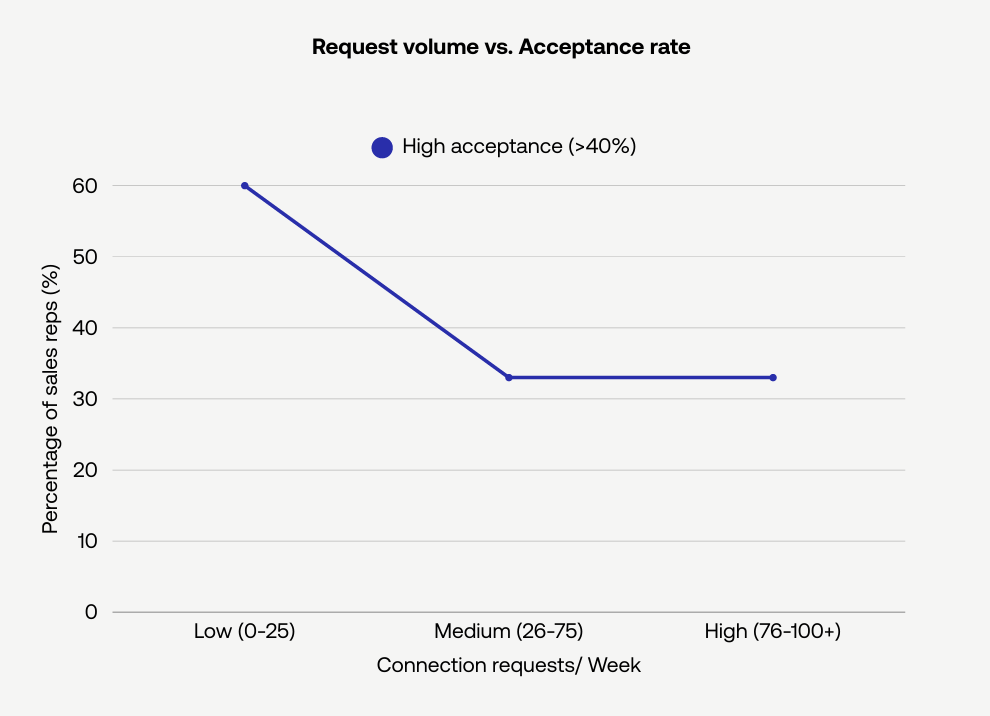
The warm-up plus personalization typically increases acceptance rates versus cold, generic requests. In our December 2025 dataset, reps sending fewer than 25 weekly requests tended to see acceptance rates above 40%. Your results will vary by audience and message quality.
ROI comparison: Static vs. intent-first
Why go through the extra step of enrichment and filtering? Because prospecting and lead generation efforts are expensive (and time-consuming). And most importantly, they dictate how full your pipeline will be.
Here’s how demographics and intent-first strategy stack up in that regard:
| Metric | Static List (Demographic) | Intent-First (PhantomBuster workflow) |
|---|---|---|
| Source | Sales Navigator search results | LinkedIn post engagement |
| Filtering | Built-in advanced search filters (job title, company size, industry) on LinkedIn Sales Navigator | AI-assisted filtering and enrichment via PhantomBuster’s AI LinkedIn Profile Enricher automation (publicly available profile fields) |
| Relevance | Low (Cold) | High (Active interest) |
| Acceptance Rate | Typically lower | Typically higher when driven by recent engagement* |
| Outcome | Generic messages ignored | Can build relationships faster as the prospect has already shown intent |
_*_Source: PhantomBuster State of Sales on LinkedIn 2026 Report, December 2025
Integrating with your tech stack
To make your prospecting process scalable for multiple team members, you need to move away from spreadsheets. While they’re effective, they could lead to data inconsistencies and duplication when various users begin using them.
A connected CRM prevents duplication and keeps context in one place, which helps reps follow up consistently.
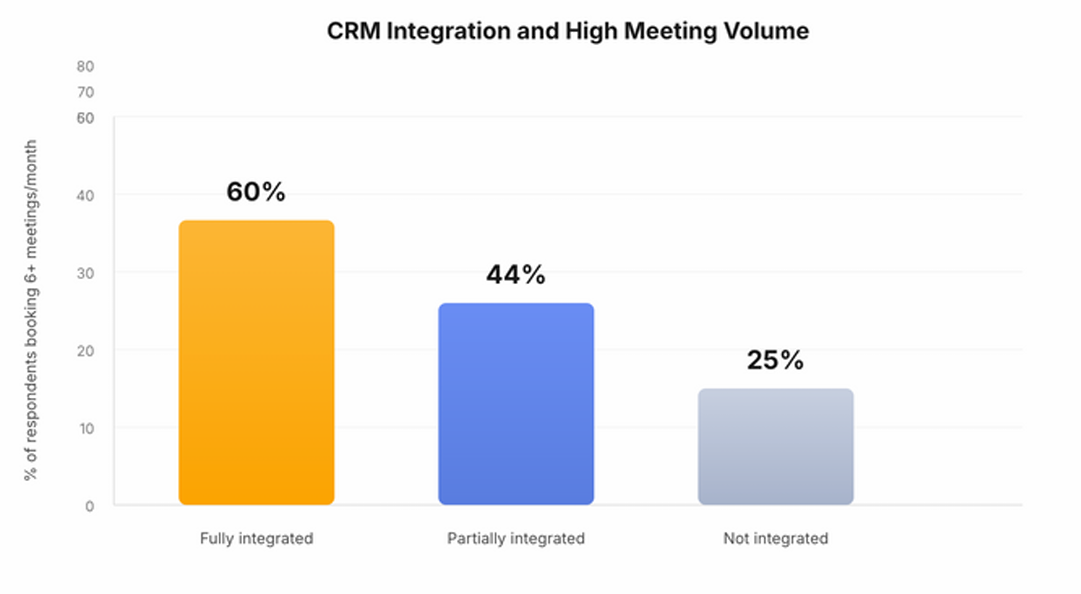
Once your CRM connection is set up and field mappings are configured, you can enable automatic sync from PhantomBuster runs into your CRM.
PhantomBuster has a native HubSpot integration for two-way sync. For Pipedrive and Salesforce, you can connect via Zapier or Make to push lead data automatically.
After you choose which fields to sync, new records and updates from PhantomBuster runs are pushed to your CRMAfter you choose which fields to sync, new records and updates from PhantomBuster runs are pushed to your CRM automatically. The CRM will serve as a single source of truth for all your sales reps to send out follow-up messages or make sales calls.
Precision is the new volume
Growth comes from focused outreach to in-market buyers—not volume for its own sake.
An intent-first strategy focuses your outreach on prospects who’ve recently engaged with relevant topics, improving your odds of a response.
A targeted workflow reduces time spent on low-fit leads and allocates volume to likely buyers.
With PhantomBuster, you run one intent-first workflow that captures engagers, enriches profiles, drafts personalized outreach, and syncs results to your CRM. The platform includes business-hour scheduling, random delays, and daily action caps to reduce risk. No tool can eliminate the possibility of platform restrictions, but operating at lower volumes with intent-based targeting helps you stay conservative.
FAQ
What is an intent-first prospecting strategy?
An intent-first strategy prioritizes prospects who have shown active behavior (intent) over those who simply match a demographic profile.
Instead of targeting only “CEOs,” target “CEOs who commented on a post about AI implementation.” This ensures your target audience is genuinely interested in the topic.
How does PhantomBuster help with intent prospecting?
PhantomBuster automates key steps in intent-based prospecting—capturing engagers, enriching profiles, drafting messages, and syncing outcomes—while you control targeting and review.
Use PhantomBuster automations to find people who liked or commented on relevant posts and export publicly available profile fields.
After that, the AI LinkedIn Profile Enricher automation helps you filter your prospect list to deliver a focused list of prospects who are key decision makers and match your ICP. You can then automate outreach to them with AI-driven personalized messages.
PhantomBuster runs in the cloud, so it doesn’t require a local extension. This reduces local footprint and lets you schedule tasks reliably.
Why is enrichment important in this strategy?
Downloading a list of post likers is not enough because it will contain competitors, students, and irrelevant contacts.
Enrichment lets you gather comprehensive lead data (like job titles and company information). This ensures your sales reps only focus on the right set of decision makers, maximizing prospecting success.
Does intent targeting improve connection acceptance rates?
In our December 2025 report, connection requests referencing recent engagement performed better than generic requests. The exact lift varies by audience, message quality, and industry.
When you reference a specific LinkedIn post in your connection request, it helps you break the ice. Warming up the leads beforehand can improve the acceptance rates as well.
Can I automate the outreach to these leads?
Yes, but be careful. While you can use LinkedIn automation tools to send outreach messages to these qualified leads, we recommend a warming phase first.
If you enable profile visits or light engagement, set conservative caps and review comments for relevance. The goal is context-aware outreach, not to simulate human behavior.
Is this strategy safe for my LinkedIn account?
With intent targeting, you can operate at lower volumes. Keep volumes conservative and vary timing to reduce risk.
PhantomBuster includes business-hour scheduling, random delays, and daily caps to reduce risk. No tool can eliminate the possibility of platform restrictions. Operating at lower volumes reduces risk, but platforms may change enforcement at any time.
Can I sync intent data to my CRM?
You can push data to your CRM. PhantomBuster has a native HubSpot integration; Salesforce and Pipedrive can connect via Zapier or Make to automate data flow.
Syncing context helps reps prep calls and emails. Only contact prospects on other channels where you have a lawful basis and an opt-out process.
Start a 14-day free trial to test the intent-first workflow with your audience.